How to Adjust the Further Dashboard to Work with Different Market Segments
Last updated: June 12, 2026
There are 8 different market types that clients can fall into. The market type for a client determines the labels and metrics in the Further Dashboard, as well as in Further’s notifications. You can change the market type of a client at any time with access to the Django admin site, this article will walk you through the process.
NOTE: You will have to repeat this process for any user associated with a community you’re making changes to. The same thing needs to be done not just for Corporate users, but for Regional and Community users as well.
Change View
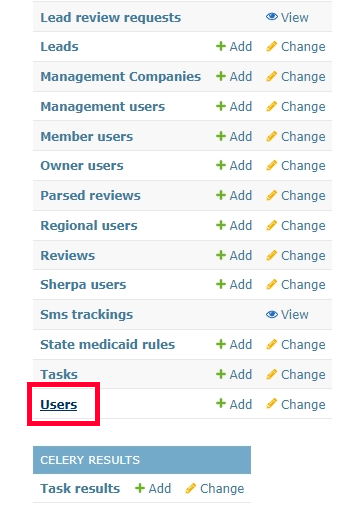
Log in to the Django/admin site and scroll down to select the Users settings.
Use the search bar at the top to find the primary account.

Select the appropriate user account. This will open the Change user page. Scroll to the Personal Info section and click the Market Type dropdown.
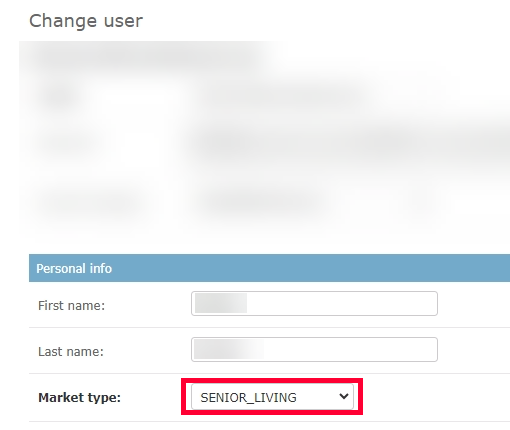
There are 8 different market-type options you can choose from:
- Default
- Senior Living
- Home Health
- Behavioral Health
- Dentist
- Vet
- Med Spa
- Multi Family
- Agency
When you’re done, click Save in the bottom right to save your changes.
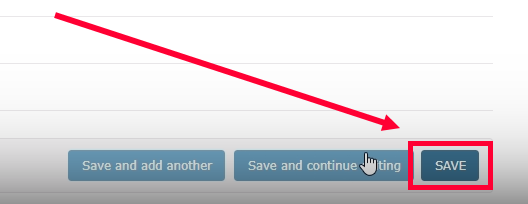
Your changes will take effect as soon as you’ve saved your changes. Based on the market type you choose, the dashboard will have different labels for metrics; for example, a move-in for Senior Living would be called admit for Behavioral Health.
Examples of different terminology:
Agency:
community: location,
communities: locations,
lead: lead,
leads: leads,
tour: appointment,
tours: appointments,
move_in: conversion,
move_ins: conversions
Behavioral Health:
community: location,
communities: locations,
lead: lead,
leads: leads,
tour: appointment,
tours: appointments,
move_in: admit,
move_ins: admits
Dentist:
community: location,
communities: locations,
lead: lead,
leads: leads,
tour: appointment,
tours: appointments,
move_in: appointment completed,
move_ins: appointments completed
Default:
community: community,
communities: communities,
lead: lead,
leads: leads,
tour: tour,
tours: tours,
move_in: sale,
move_ins: sales
Home Health:
community: location,
communities: locations,
lead: lead,
leads: leads,
tour: assessment,
tours: assessments,
move_in: activation,
move_ins: activations
Multi Family:
community: location,
communities: locations,
lead: lead,
leads: leads,
tour: tour,
tours: tours,
move_in: lease signed,
move_ins: leases signed
Medical Spa:
community: location,
communities: locations,
lead: lead,
leads: leads,
tour: appointment,
tours: appointments,
move_in: appointment completed,
move_ins: appointments completed
Senior Living:
community: community,
communities: communities,
lead: lead,
leads: leads,
tour: tour,
tours: tours,
move_in: move-in,
move_ins: move-ins
Vet:
community: location,
communities: locations,
lead: lead,
leads: leads,
tour: appointment,
tours: appointments,
move_in: appointment completed,
move_ins: appointments completed