Reset Your Further Dashboard Password
Last updated: September 1, 2026
If you’ve forgotten your password, you can easily reset your password or request an email link to access your account! With these two convenient methods, you can be back on track with your work in a couple of clicks.
Note: All user levels can reset their login passwords.
To get started, follow the steps below.
Access the Login Page
Open up the following URL in your browser: https://dashboard.talkfurther.com/login
In the Email address field, enter the email address associated with your account and click Next.
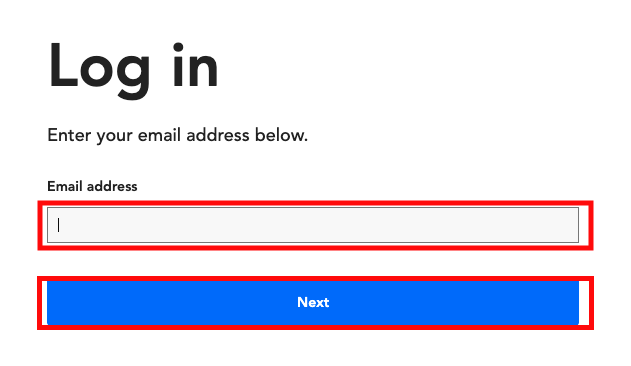
The Enter password page will open.
Reset Your Password
On the Enter Your Password page, click Forgot Password? link below the Password field.

You will receive an email with a link to enter a new password for your Further Dashboard. Once you enter the new password, you’ll be able to access the dashboard.
Troubleshooting
Not sure which email you used? If you're uncertain which email address you used to create your account, try the Forgot Password option with each possible email address you may have used.
Didn't receive the reset email? Check your spam or junk folder if you don't see the reset email in your inbox. Note that you'll only receive a reset email if an account exists for the email address you entered.
Request Email Link
On the Enter Your Password page, click the Send a code to email instead? link at the bottom of the pop-up.
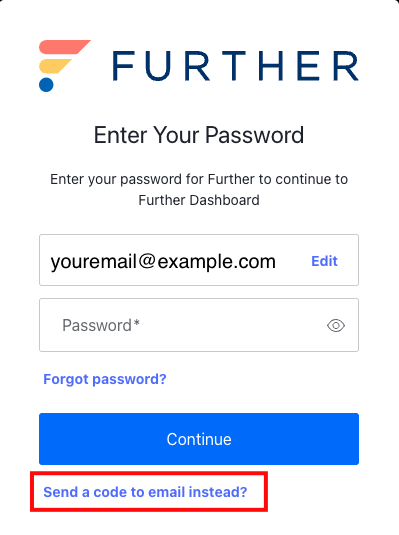
You will receive an email with a link to open the Further Dashboard with no password required.